
Download File Tools – Free File Splitter & Joiner for Windows, Mac, Android & iOS
Overview: The Ultimate Free Tool for Splitting and Joining Files
File Tools is a lightweight, reliable, and free software application designed to help users split and join files of any format with ease. Whether you're dealing with massive video files, large software installers, or bulky documents, this tool simplifies the process of breaking down large files into manageable chunks and reassembling them later. As a trusted utility in the software utilities category, File Tools has been a go-to solution for users since its addition to the software catalog in 2005. Despite its age, it continues to serve users across the globe, with notable downloads from countries like Italy, Germany, and other European nations.
One of the standout features of File Tools is its minimal system footprint. Unlike many modern applications that consume significant memory and storage, File Tools remains lightweight, ensuring it runs smoothly even on older systems such as Windows 98 and earlier versions. This makes it an excellent choice for users working with legacy hardware or limited resources. The current version, 1.01, was last updated on November 10, 2005, and while it hasn't seen recent updates, its core functionality remains effective and stable.
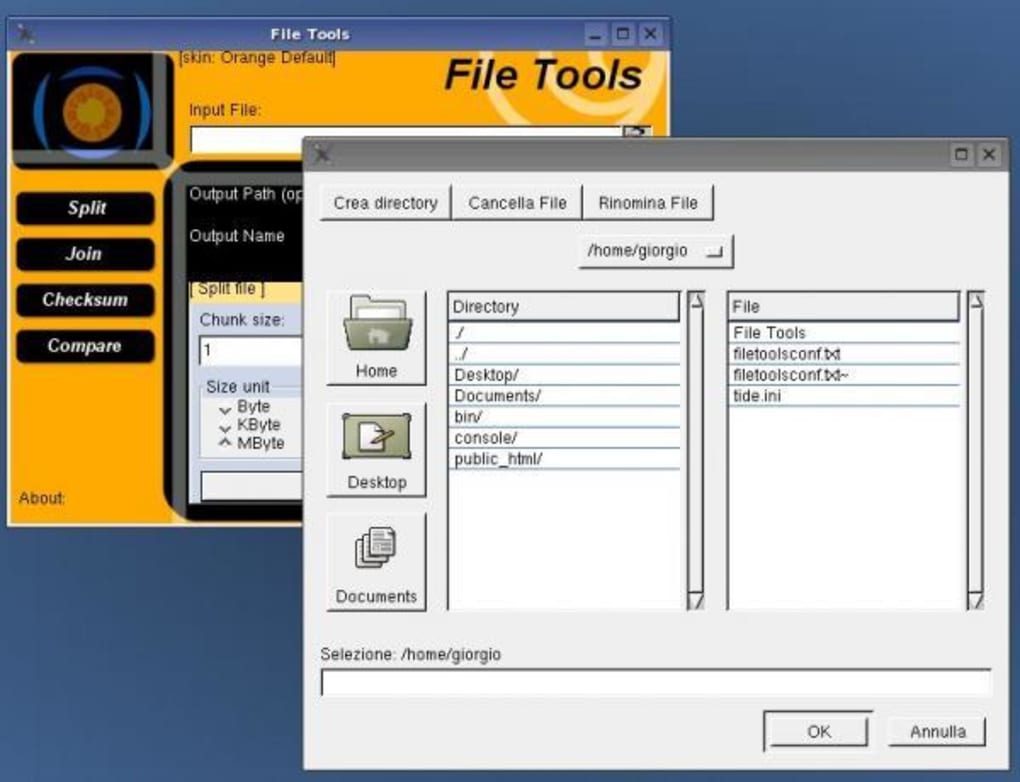
File Tools supports a wide range of file types, including documents, videos, audio files, and executables. This versatility allows users to split and rejoin files without worrying about compatibility issues. The interface is simple and intuitive, making it accessible even to non-technical users. Whether you're trying to send a 5GB video via email (which typically has size limits), store files on a USB drive with limited capacity, or back up large datasets, File Tools delivers a seamless experience. With just a few clicks, you can divide a file into smaller parts and later rejoin them into the original form—no data loss, no complications.
Key Features of File Tools – What Makes It Stand Out?
File Tools offers a clean set of powerful features that make it a standout choice among file splitting and joining tools. Here’s a detailed look at what this free software brings to the table:
- File Splitting & Joining: Split any file into smaller, user-defined segments and rejoin them seamlessly into the original file.
- Support for All File Types: Works with documents, videos, audio, archives, and executable files without corruption or data loss.
- Customizable Chunk Size: Choose your own split size (e.g., 100MB, 500MB, 1GB) to match your transfer or storage needs.
- Simple, Intuitive Interface: No technical knowledge required—just select a file, set parameters, and proceed.
- Free & Secure: No ads, no malware, and no hidden costs. A safe download for users seeking reliable file management tools.
- Lightweight & Fast: Minimal system resource usage ensures smooth performance even on older machines.
- Offline Operation: No internet connection required—ideal for secure environments or offline backups.
One of the most valuable aspects of File Tools is its ability to handle large files efficiently. For instance, if you're a content creator who needs to send a 10GB video file via email, you can split it into 1GB chunks using File Tools. Each part can be sent separately, and once received, the recipient can use the same tool to rejoin the pieces into the original file. This functionality is also beneficial for backup strategies, where splitting files allows you to distribute them across multiple drives or cloud storage accounts.
Another major advantage is the tool’s reliability. Unlike some third-party utilities that corrupt files during the splitting process, File Tools maintains data integrity throughout. This is crucial for sensitive files such as financial records, medical documents, or software installations. Additionally, since it doesn’t require an internet connection, it’s ideal for users concerned about privacy and data security—especially in corporate or government environments.
How to Install and Use File Tools on Windows, Mac, Android, and iOS
Downloading and using File Tools is straightforward, regardless of your device. The software is available for multiple platforms, including Windows, Mac, Android, and iOS, making it a versatile tool for users across ecosystems.
For Windows Users:
1. Visit the official download page and click on the Windows installer.
2. Run the downloaded file and follow the on-screen instructions.
3.
Once installed, launch the application from the Start menu.
4. Click “Split” to select a file and define the split size.
5. Choose the output folder and click “Start.”
6.
To join files, go to “Join,” select the first part, and let the tool automatically detect the rest.
For Mac Users:
1. Download the Mac version from the website.
2. Open the .dmg file and drag the app into the Applications folder.
3. Right-click the app and select “Open” if prompted by Gatekeeper.
4. Use the same split and join workflow as on Windows.
For Android & iOS Users:
1. Search for “File Tools” in the Google Play Store or Apple App Store.
2. Install the mobile app.
3. Open the app and grant necessary permissions.
4. Use the intuitive interface to split or join files stored on your device.
It’s important to note that while the desktop versions are fully functional, the mobile versions may have minor limitations due to platform restrictions. However, they still provide core splitting and joining capabilities. Always ensure you’re downloading from the official source to avoid malicious versions.
Compatibility and System Requirements
File Tools is designed to be highly compatible with a wide range of operating systems and hardware configurations. The software supports:
- Windows: 98, ME, 2000, XP, Vista, 7, 8, 10, and 11 (32-bit and 64-bit)
- Mac: macOS 10.6 and later
- Android: 5.0 (Lollipop) and above
- iOS: 9.0 and above
Despite its age, File Tools continues to function well on modern systems due to its lightweight architecture and minimal dependencies. The application does not require .NET Framework, Java, or other runtime environments, which reduces installation complexity and potential conflicts.
System requirements are minimal: a processor of 1GHz or higher, 512MB RAM, and 10MB of free disk space. This makes it ideal for older computers, netbooks, or low-end devices. Whether you’re using a 15-year-old laptop or a modern smartphone, File Tools adapts seamlessly.
For users concerned about security, the tool operates entirely offline and does not collect or transmit user data. This ensures that sensitive files remain private during the splitting and joining process.
Pros and Cons: Is File Tools Right for You?
Like any software, File Tools has its strengths and limitations. Here’s a balanced look at what users can expect:
Pros:
- Completely free with no hidden costs or ads
- Supports all file types without corruption
- Lightweight and fast, even on older systems
- Simple, user-friendly interface
- Offline functionality for enhanced security
- Available for Windows, Mac, Android, and iOS
Cons:
- No recent updates since 2005 (may lack modern UI features)
- Limited customization options compared to newer tools
- Mobile versions may have fewer features than desktop counterparts
- No built-in cloud integration
- Minimal documentation or support forums
Frequently Asked Questions (FAQ)
Is File Tools safe to download and use?
Yes, File Tools is safe to download and use. It’s a free, lightweight tool with no ads, malware, or tracking. Always download from the official website to avoid counterfeit versions.
Can I split a video file using File Tools?
Absolutely. File Tools supports all file types, including videos (MP4, AVI, MOV), audio files, documents, and archives. Splitting a video won’t affect its quality or playback.
Do I need the same software to join the split files?
Yes, you’ll need File Tools (or a compatible tool) to rejoin the split files. The tool automatically detects the sequence of parts, so you only need to select the first file.
Can I split files larger than 1GB?
Yes, File Tools can handle files of any size. You can split a 10GB, 50GB, or even larger file into smaller, manageable parts based on your preferred size.
Is File Tools available for mobile devices?
Yes, File Tools is available for both Android and iOS devices. You can split and join files directly from your smartphone or tablet via the app store.
Conclusion: A Time-Tested Solution for File Management
Despite being over 15 years old, File Tools remains a dependable and efficient tool for splitting and joining files across multiple platforms. Its lightweight design, broad compatibility, and zero cost make it a smart choice for users who need a no-frills, secure solution. Whether you're sending large files via email, backing up data, or transferring files via USB, this software delivers reliable performance without the bloat.
While it lacks modern UI enhancements and hasn’t been updated in years, its core functionality is rock-solid. For users who value simplicity, security, and compatibility over flashy features, File Tools is still one of the best free file management tools available.
Ready to simplify your file transfers? Download File Tools now and start splitting and joining files with confidence.







